

Easy Steps For Beginners
This is A free step by step guide of starting a beautiful and functional blog, elementary steps.
Yeah! I guess you are ready now?
I will show you how to start building your blog in a quick and short way; I have owned some blogs since 2013 and loves helping others do the same.
Starting a blog can be atimes intimidating and overwhelming. My free guide will be sure straightforward to follow, even with basic computer skills.
First, let’s know what’s blog is all about
A blog is all about a type of web-page or website that is mainly written content, which can also be called A blog post; the personal perspective aims at directly connecting with readers and the blogger.
The direct connection is the most benefits of starting one. which allows the blogger to interact and share ideas with the people, it builds trust between the reader and the blogger
If you are determined to be a successful blogger, there is only one requirement you need at first, which is A Passion For writing, but before we go on with that, let me show you how to create one.

How To Build A Blogg In 6 Steps
- Find/Chose A Blog Name
- Publish It Online
- Start Customizing Your Blog
- Make Your First Post And Publish it
- Promote It
- Monetize And Make Money With It
1.STEP Find/Choosing A Name
Choosing a name and finding your passionate topic
If You are confused about finding one, this is what you would consider.
Your Hobbies and Passion examples Like Sports, Travelling, cooking, pet breeding, fashion and many more
Another one is Your Life Experiences, sharing your experience and Knowledge, creating Topics around it, and how it can help others in the same situation, for example, blogging about dealing with trouble moments, challenges in marriages, or disease.
You can also choose to blog personally… the personal blog is all about you which includes a variety of Topics like what you do on a daily bases, which are an excellent way of sharing ideas with the world.
Immediately after You have chosen your blog name the next is to select your hosting plan, this is a hosting company that stores all your blog files and runs it to the users when they type your address name anywhere on the internet.
One of the hosting plans I do recommend is Bluehost, Bluehost has ranked at the top for both uptime and loading times for more than a year, they offer strong security support and a money-back guarantee, and it’s also user-friendly with affordable rates. They both offer you Domain Name and hosting.
When choosing a domain name, you will have extensions to choose from, most popular are .com .net or .org…all works well, Examples: You can say Kyleblog.com or net, note in your name you can’t space any word.
If you are prompted with a notice of the not available name, continue changing your name or grab another Extension, instead of .com you can go for .net with the same name.
After this, you will be sent credentials which you will use to login to your Cpanel and set your site running.
2. Now publish your blog online
You need software to build your blog, the most popular software is called WordPress, which you will see in the Cpanel area, customizable, and easiest to use. note that there will be another option for you to choose here, but WordPress is most simple and easy to under understand
The Bluehost service center can help you with the procedures once you contact them, know more about Bluehost
3. Start Customizing Your Blog,
4. Make Your First Post, Publish it And Promote It
Now the next will be you installing a theme which you will use to customize your website that you will post your content for readers using the Appearance, Widgets, Header, Background, Customise and the comment section tab Menu and you will be able to control which interface that suits your needs… Note there are premium themes that you can buy, download and upload from your computer if you are not satisfied with the free ones, or you can purchase immediately from WordPress using the Premium Themes Tab Menu.
Inside your WordPress Menu that looks like this, you can Add New Post with Title
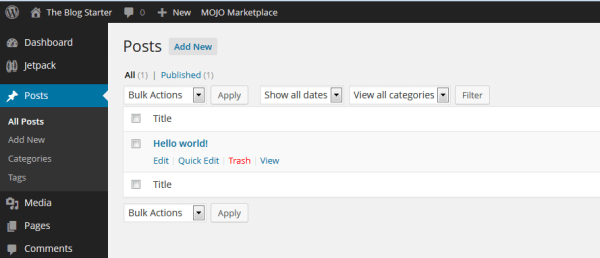
You can also add Media (Images and Video files) to your post, once you have finished writing your post hit the publish button and your post will be live
After making your post and the customized blog seems okay with you then the next thing is to promote it, one of the most popular and simple ways to do that is Social Media like Facebook, Instagram, Twitter, and Pinterest if you have posted quality content on your blog then with them your blog will definitely go viral.

5. Monetize And Make Money With It
Now making money is the next thing that will be in your mind since your blog have started going viral, there are many ways of making money with your blog it’s either Affiliate Marketing, or writing reviews on other people’s products, with a popular blog you can place other people’s product for advertisement by taking advantage of Google Adsense.
I guess by now you would have known more of the benefit of blogging, how to start and build one, Drop a comment on the box below.

 Wealth influencer